Google Colab is the fastest way to open a GPU notebook, but it stops being the right tool once a project needs repeatable GPU access, long runtimes, or predictable pricing. These are the best Google Colab alternatives for free or low-cost deep learning GPUs in October 2026.
Takeaways
- Thunder Compute is a cost-effective dedicated option, listing an RTX A6000 at $0.35/hr and an A100 80GB at $1.09/hr.
- Kaggle Notebooks is the best free alternative, with a visible ~30 GPU-hours/week quota on a P100.
- Colab's compute units buy a budget, not a reserved GPU, so Pro+ users can still be handed a T4.
- Free Colab sessions cap at 12 hours and disconnect after ~90 minutes idle.
- Dedicated GPU clouds win for long or repeatable training, with SSH access and transparent hourly pricing.
Google Colab in 2026
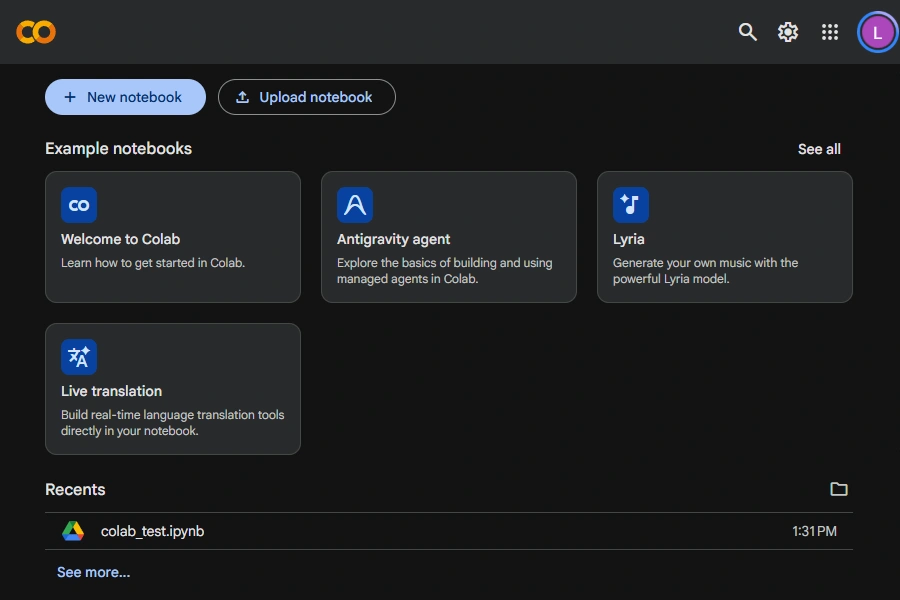
In 2026, Google Colab is no longer just free GPU notebooks in a browser. Over 2025 and 2026, Google reshaped it into an AI-first coding surface through a series of features:
- March 2025: agentic AI assistant (Data Science Agent).
- June 2025: free terminal access.
- July 2025: default runtime moved to Python 3.12.
- September 2025: TPU v5e replaced the older v2-8 in the free tier.
- March 2026: open-source Colab MCP Server letting AI agents control Colab notebooks programmatically.
- June 2026: Colab CLI to provision Colab GPU and TPU runtimes from the terminal.
- August 2026: default runtime moved to Python 3.13.
The economics did not change. Paid access still runs on compute units, not reserved hardware. GPU assignment stays dynamic and unguaranteed, and free sessions keep the 12-hour cap and 90-minute idle disconnect. These limits are why a serious project still outgrows Colab.
Compare Google Colab Alternatives
The best Colab alternative depends on your priority: free notebooks, predictable hourly billing, or full control of a dedicated machine.
Thunder Compute is the strongest paid option for low-cost dedicated GPUs, and Kaggle Notebooks is the main free option for lighter work.
| Provider | Typical Notebook GPUs | Price | Credits | Session limits | Best for |
|---|---|---|---|---|---|
| Thunder Compute | RTX A6000, L40, A100, H100 | $0.35-$3.20/hr | N/A | Billed per minute, on-demand | Uninterrupted GPU access, customizable instances, long-term storage |
| Google Colab Free | T4 | Free | N/A | 12hr/session, 90min idle disconnect, pre-emptible | Quick trials, learning, classroom demos |
| Google Colab Pro | T4, L4, A100 40GB, A100 80GB | $9.99/mo + CU1 top-offs | 100 CU | 24hr/session, pre-emptible | Colab users wanting longer runtimes |
| Google Colab Pro+ | T4, L4, A100 40GB, A100 80GB | $49.99/mo + CU1 top-offs | 600 CU | 24hr/session, background execution | Unattended jobs, most compute units |
| Kaggle Notebooks | P100 | Free | None | 9hr/session, 30hr/week | Competitions, light fine-tunes |
| Lightning AI | T4, L4, A10G, L40S | Free | 15 credits (~22 T4-hrs)4 | 4hr studio restart, persistent storage | IDE-first workflow, persistent environment |
| AWS SageMaker Studio Lab (deprecated2) | Single GPU (varies) | Free | None | 4hr/session, 4hr/24hr | Short GPU demos, teaching |
| Paperspace Gradient Free3 | M4000, P4000 | Free | None | 12hr auto-shutdown | Learning PyTorch/TensorFlow |
| Paperspace Gradient Pro3 | M4000, P4000, A5000, A6000, A100-80GB | $8/mo | None | Configurable auto-shutdown | Private projects, mid-range GPUs |
| Paperspace Gradient Growth3 | M4000, P4000, A5000, A6000, A100-80GB | $39/mo | None | Configurable auto-shutdown | Teams, high-end GPU access |
| Runpod | 15+ GPUs to choose from | $0.27/hr-$8.99/hr | None | No hard stop | DIY VM + SSH-notebook optional |
| Modal | T4, A100, H100 (serverless) | ~$0.59/hr-$3.95/hr (per second) | $30/mo free credits | Scales to zero, cold starts, preemptible | Bursty serverless inference, batch jobs |
| Lambda | A100, H100, GH200, B200 | A100 40GB $1.99/hr, H100 from $3.29/hr | None | No hard stop, reserved options | Research-grade on-demand and clusters |
| 1CU = Compute Units. Rates are approximate based on current unit consumption. 2AWS closed SageMaker Studio Lab to new signups on July 30, 2026. 3Paperspace Gradient is now operated under DigitalOcean. 4Up to 30 credits/month, but most users report getting only 15. |
|||||
Google Colab Pricing and Runtime Limits
Colab's paid tiers bill in compute units and cap session length. Understand both before committing to a plan.
Google Colab Free Tier Limits
The free tier gives T4 GPUs for up to 12 hours per session, but availability is not guaranteed. Google's own FAQ states that free-tier resource limits "fluctuate" and GPU access "varies over time," with premium hardware "heavily restricted" for non-paying users.
Google Colab Free works well for coursework, debugging, and first-pass experiments. But it becomes frustrating if: a model needs the same GPU every run, training must continue overnight, or an interrupted session wastes progress.
The 90-minute idle disconnect is the limit most teams hit first. Step away during a training run and Colab ends the session, losing unsaved progress.
Google Colab Paid Tiers
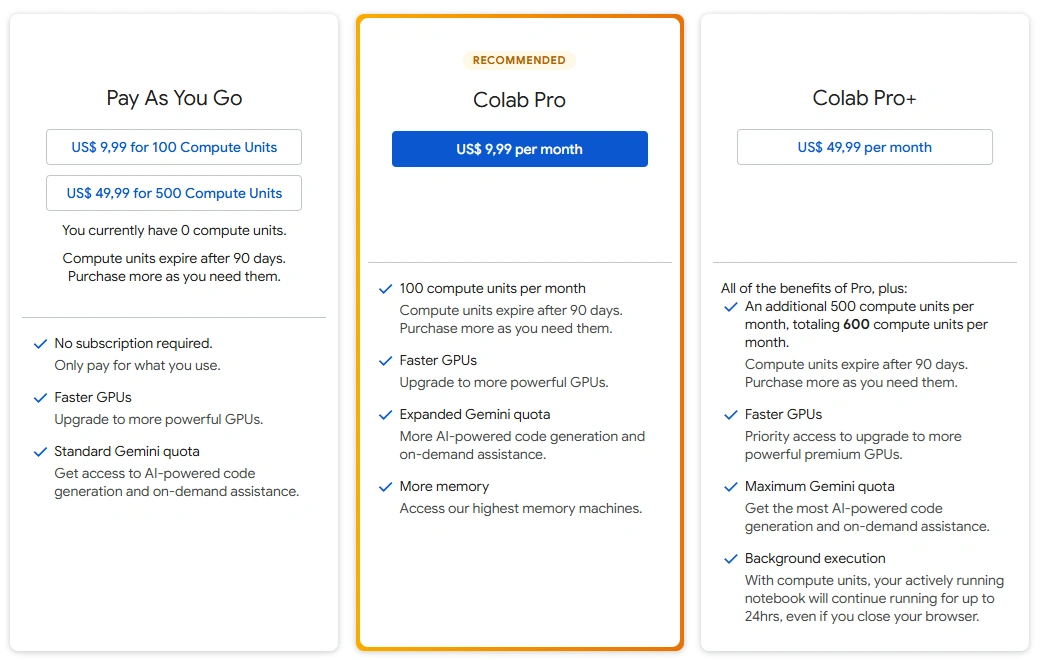
Colab Pro and Pro+ raise compute availability but do not guarantee specific GPUs. The compute-unit system means you buy a budget, not reserved hardware.
This is how Google Colab pricing breaks down:
- Pay-as-you-go - $9.99 for 100 CU.
- Colab Pro - $9.99/month for 100 CU. No idle disconnect. Up to 24h sessions.
- Colab Pro+ - $49.99/month for 600 CU. Adds background execution.
Google Colab GPU Specs and Compute Unit Burn Rates
| GPU | VRAM | Architecture | Compute Units per hour | Hours per 100 CU | Approx. USD/hr |
|---|---|---|---|---|---|
| T4 | 15 GB | Turing | ~1.19 | ~84 hr | $0.12 |
| L4 | 22.5 GB | Ada Lovelace | ~1.71 | ~58 hr | $0.17 |
| A100 | 40 GB | Ampere | ~5.40 | ~18 hr | $0.54 |
| A100 | 80 GB | Ampere | ~7.52 | ~13 hr | $0.75 |
| RTX PRO 6000 | 96 GB | Blackwell | ~8.71 | ~11 hr | $0.87 |
| H100 | 80 GB | Hopper | Unknown | ||
| Rates measured by mccormickml.com in March 2026 and are not officially published by Google. | |||||
Even paying users are not guaranteed a premium GPU. Per the Colab FAQ, access depends on "availability and your usage patterns," not a reservation. You can pay for Pro+ and still be handed a T4.
Read nextFree Cloud GPU Credits in 2026 GPU credit programs, eligibility requirements, provider policies and application options.
What to Look for When You Outgrow Colab
Once a project needs more than Colab provides, four things separate a dedicated GPU cloud from a shared notebook tier.
- A dedicated GPU you reserve, not dynamic shared allocation. You keep the card you provisioned as long as you pay, with no compute-unit balance bumping you from an A100 to a T4 mid-job.
- No idle timeout or session cap on long runs. Overnight training and multi-hour fine-tuning need the instance up whether or not you are typing.
- Full environment control through SSH or root access, not just a notebook cell. You can install a specific CUDA version, run background processes, and attach persistent storage that survives between sessions.
- A transparent price per GPU-hour, not an opaque compute-unit budget. A published hourly rate tells you what a run costs before you start it.
These four points decide which provider fits a given budget and workflow. If moving beyond notebooks also means managing Kubernetes and cloud storage, the Nebius vs Thunder Compute comparison explains the setup involved.
1. Thunder Compute: Cheapest Hourly Cost Without Interruptions
Thunder Compute removes the three main Colab pain points: unclear pricing, interrupted sessions, and uncertain GPU assignment. Its dedicated GPUs cost less than the other mainstream providers.
| GPU | Thunder Compute | Runpod | Paperspace |
|---|---|---|---|
| RTX A6000 | $0.35/hr | $0.59/hr | $1.89/hr |
| L40 | $0.79/hr | $0.82/hr | N/A |
| A100 80GB | $1.09/hr | $1.79/hr | $3.18/hr |
| H100 80GB | $3.20/hr | $3.99/hr | $5.95/hr |
| Last reviewed on October 9, 2026. | |||
Thunder Compute is designed for notebook users who want to keep working from VS Code, Cursor, or Devin Desktop rather than a browser tab. One-click or CLI-based access needs no marketplace workflow.
Free credits for US students: Sign up with your student email and automatically get $20 of credit, no application required.
2. Kaggle Notebooks: Generous Free GPU
Kaggle Notebooks is the best free Colab alternative. Instead of Colab's opaque free-tier allocation, Kaggle publishes a visible weekly quota of ~30 GPU-hours on a P100, with no credit card required.
Kaggle Notebooks work best for competitions, public examples, and small experiments using Kaggle datasets. Projects that need overnight runs or the same GPU every session should move to a paid cloud.
3. Lightning AI: Free GPU Hours in a Persistent IDE
Lightning AI gives developers a persistent cloud IDE with a free GPU tier. The free plan includes 15 credits/month, about 22 hours on a T4, with no credit card required. Verification is near-instant with a work or .edu email, though personal-email accounts can trigger extra steps.
Installed packages, files, and configurations survive between sessions, unlike Colab and Kaggle where environments reset on disconnect. Studios restart every 4 hours on the free plan, but storage stays intact. Free-tier GPUs include the T4, L4, A10G, and L40S.
Credits do not roll over month to month. The same 15 credits buy about 8 hours on an A10G versus 22 hours on a T4.
4. AWS SageMaker Studio Lab (Closed to New Signups)
SageMaker Studio Lab offered free GPU sessions capped at 4 hours each and 4 GPU-hours per 24 hours. It suited teaching, demos, and short experiments.
AWS closed Studio Lab on 30 July 2026. New users must use SageMaker Studio's paid tiers instead. At $0.74/hr for a basic T4 instance, it is enterprise-priced infrastructure, not a Colab replacement.
Read nextExplore SageMaker alternatives for accessible compute power.
5. Paperspace Gradient: Free and Paid Tiers Under DigitalOcean
Paperspace Gradient offers free and paid subscription tiers. The free plan gives M4000 and P4000 GPUs (both 8GB) for notebooks, with a 12-hour auto-shutdown and 5GB storage. GPU access depends on availability, and free-tier notebooks are public.
Paid plans unlock more. Pro ($8/mo) adds private projects and GPUs up to the A4000 (16GB); Growth ($39/mo) adds access to the A100-80G (80GB). Higher-end GPUs like the H100 cost extra hourly on top of the subscription. At $1.89/hr for an RTX A6000 and $3.18/hr for an A100 80GB, Paperspace is less attractive when price is the priority.
6. Runpod: Raw VMs at Marketplace Prices
Runpod is a strong Colab alternative when a project needs broader GPU choice and more VM-style control. Setup involves templates, marketplace supply, storage, and manual environment configuration, so it suits developers comfortable with container workflows.
Runpod is a weaker fit than Thunder Compute when the goal is the lowest simple on-demand price for a dedicated A6000 or A100. If Hyperbolic is also on your shortlist, compare pricing and developer workflows in Hyperbolic vs Thunder Compute.
7. Modal: Serverless GPUs With a Free Tier
Modal is a serverless GPU platform that bills per second and scales to zero, so idle code costs nothing. Every account starts with $30/month in free compute credits, and on-demand rates run from about $0.59/hr for a T4 to $3.95/hr for an H100. It suits bursty inference and scheduled batch jobs more than long interactive notebooks.
Modal is not a notebook IDE. You define functions and containers in Python, and Modal runs them on demand, which introduces cold starts of a few seconds and preemption by default. For a Colab user, it fits deploying or batch-running code rather than day-to-day experimentation in a live notebook.
8. Lambda: Research-Grade GPUs at Neocloud Prices
Lambda is a neocloud aimed at research and production teams that want dependable performance on standard NVIDIA hardware. On-demand single-GPU instances list around $1.99/hr for an A100 40GB and from $3.29/hr for an H100, billed per minute with no egress fees.
Lambda sits above the budget providers on price, but features reserved capacity and multi-GPU cluster access. It fits projects that need guaranteed, research-grade hardware for sustained or distributed training, and is a weaker fit for someone who wants a single cost-effective GPU to replace a Colab notebook. For projects considering larger GPU clusters, CoreWeave vs Thunder Compute and Crusoe Cloud vs Thunder Compute compare infrastructure and deployment requirements.
Choosing the Right Google Colab Alternative
| Priority | Go with |
|---|---|
| Longest uninterrupted training for the money | Thunder Compute A6000/A100 |
| Totally free, light workloads | Kaggle Notebooks |
| Zero-setup classroom demos | Google Colab Free |
| High-end GPU for one-off job | Runpod or Thunder Compute A100 80GB |
| GUI-centric, team collaboration | Paperspace Gradient Pro |
How to Use a GPU in Google Colab
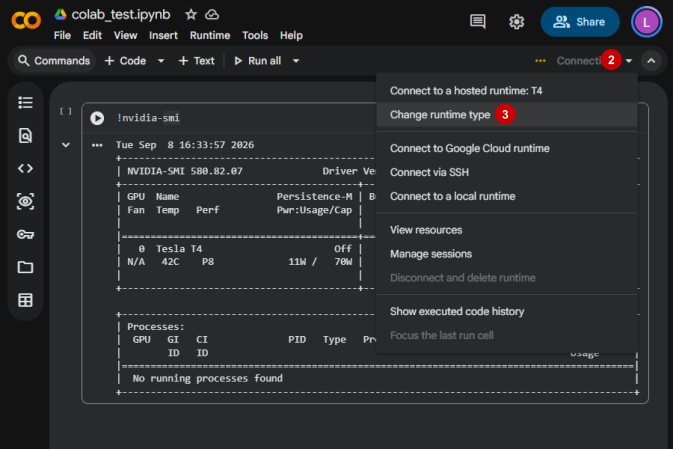
- Open the notebook in Google Colab.
- Click
Runtime. - Click
Change runtime type.
- Set
Hardware acceleratortoGPU. - Save the setting and reconnect the runtime.
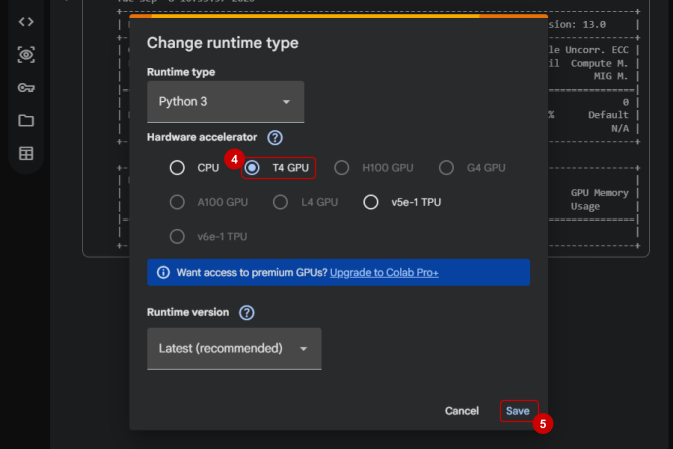
- Run
!nvidia-smiin a cell to confirm the GPU attached.
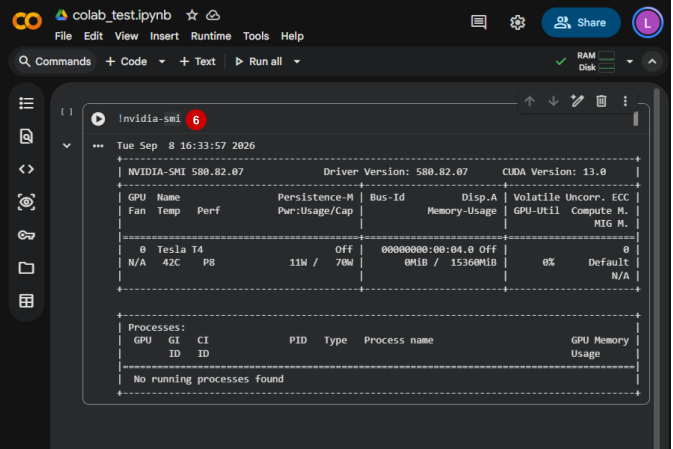
Google Colab may assign different GPU models on different sessions. Users who need the same GPU every time should move to a dedicated GPU cloud.
How to Move a Colab Project to Thunder Compute in Under 10 Minutes
Both platforms support Jupyter notebooks and standard Python environments, so migration is mostly mechanical.
- Download the
.ipynbnotebook from Google Colab. - Install the Thunder Compute VS Code extension or the Thunder Compute CLI.
- Launch an RTX A6000 or A100 instance on Thunder Compute.
- Upload the notebook and any local project files.
- Reinstall project dependencies inside the Thunder Compute environment.
- Run the notebook against the dedicated GPU.
Thunder Compute is usually the better home for notebooks that need overnight runs, reproducible GPU access, or lower cost per completed job. After migrating, use these techniques to cut cloud GPU costs during prototyping to limit idle time and right-size experiments.
Which Google Colab Alternative Fits Each Workflow?
| Workflow | Best choice | Why |
|---|---|---|
| Cheapest dedicated GPU for repeated work | Thunder Compute RTX A6000 | 48 GB VRAM for $0.35/hr |
| Cheapest dedicated A100 for training | Thunder Compute A100 80GB | $1.09/hr, billed by the minute |
| Free classroom notebook | Google Colab Free | Requires almost no setup |
| Free competition notebook | Kaggle Notebooks | Integrates directly with Kaggle datasets |
| DIY VM with more hardware choice | Runpod | Exposes a larger marketplace of GPU types |
| Managed notebook UI over raw price | Paperspace Gradient | Focuses on notebook workflow convenience |
| Bursty or serverless inference | Modal | Per-second billing, scales to zero |
| Research-grade or multi-GPU clusters | Lambda | Reserved capacity, dependable performance |
Read nextCheapest Cloud GPUs Provider rates, GPU options, availability and platform tradeoffs.
Last Thoughts on Google Colab Alternatives
Colab remains a good starting point but stops being cost-effective once a project needs stable access to dedicated GPUs. Thunder Compute is the best Colab alternative for most indie developers, researchers, and startups: lower prices, dedicated machines, and a simpler workflow. Kaggle Notebooks and Lightning AI still fit short free experiments, while serious training and repeatable development belong on a dedicated GPU cloud.
FAQ
What is the best Google Colab alternative for cheap dedicated GPUs?
Thunder Compute lists RTX A6000 at $0.35/hr and A100 80GB at $1.09/hr, with no compute units, no forced preemption, and no unclear GPU assignment. It is the strongest paid Colab alternative for dedicated GPU access.
Do Google Colab alternatives throttle heavy users?
Free notebook platforms like Colab Free and Kaggle Notebooks use quotas, runtime caps, or availability limits. Paid hourly GPU clouds like Thunder Compute and Runpod bill for usage instead, though stock can still sell out.
How do I use a GPU in Google Colab?
Open a notebook, click Runtime, click Change runtime type, and set Hardware accelerator to GPU. Run nvidia-smi in a cell to confirm the GPU was assigned.
What are compute units on Google Colab?
Compute units (CUs) are Colab's billing currency for accelerated hardware. Each paid plan includes a monthly CU allowance; additional units cost $9.99 per 100 CU. A T4 burns ~1.19 CU/hr; an A100 40GB burns ~5.40 CU/hr; an A100 80GB burns ~7.52 CU/hr.
What is the Google Colab price?
Colab Pro is $9.99/month for 100 CU. Colab Pro+ is $49.99/month for 600 CU with background execution. Pay-as-you-go top-offs are $9.99 per 100 CU. The free tier provides shared GPU access for up to 12 hours per session.
Is Google Colab free?
Yes. The free tier gives shared GPU access (typically a T4) for up to 12 hours per session, but GPU availability is not guaranteed and sessions disconnect after ~90 minutes of inactivity.
Does Colab Pro guarantee an A100?
No. Even on Pro+, GPU assignment depends on availability and usage patterns. Google's FAQ states premium hardware access is not guaranteed; you can pay for Pro+ and still receive a T4.
How long can a Google Colab session run in 2026?
Free sessions cap at 12 hours and disconnect after ~90 minutes of inactivity. Pro and Pro+ sessions can run up to 24 hours, but only while compute units remain. Exhausting units mid-session reverts the runtime to free-tier limits.
How many hours does 100 compute units buy on Colab?
A T4 burns ~1.19 CU/hr, so 100 CU covers ~84 hours. An A100 40GB burns ~5.40 CU/hr, so 100 CU covers ~18 hours. An A100 80GB burns ~7.52 CU/hr, so 100 CU covers ~13 hours.
Is SageMaker Studio Lab still available?
AWS closed Studio Lab to new signups on 30 July 2026. Existing accounts continue to work, but new users must use SageMaker Studio's paid tiers instead.